
Articles
Crafted vs AI-generated: how to read a Spec-Driven repo
Learners often ask which files a human wrote and which an agent wrote. In Spec-Driven Development the useful split is not committer names — it is contract vs implementation. Here is a general way to tell them apart and how to study commit by commit.
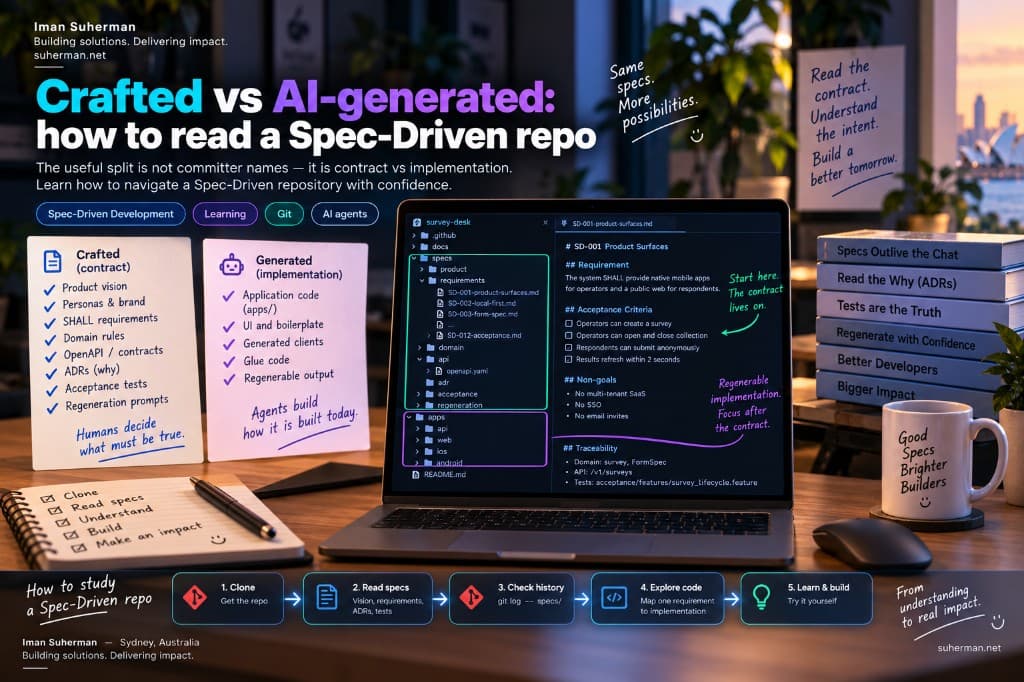
A common question after opening a Spec-Driven repository: “Which parts were crafted by a human, and which were generated by AI? Would it be easier if git used different committers for each?” That instinct is healthy — you want a map for learning, not a mystery box. The answer is usually simpler than two fake identities in git.
Loading diagram…
The useful split is not “human commit” vs “AI commit”
Modern coding sessions blur authorship. A human may paste half a function; an agent may rewrite a whole module; the same person then edits three lines by hand. Labelling every file as 100% crafted or 100% generated is usually false precision. Separating committers (for example one Git identity for “crafted” and another for “AI”) can help demos, but it does not prove truth — anyone can switch identities — and it trains the wrong habit: reading people instead of reading contracts.
What you actually need as a learner is a map of intent: what was decided on purpose, what can be regenerated without losing the product story, and where to place your attention when studying commit by commit.
A better mental model: contract vs implementation
Loading diagram…
- Crafted (usually): product vision, personas, brand, SHALL requirements, domain rules, OpenAPI/contracts, ADRs, acceptance scenarios, regeneration prompts, demo scripts.
- Generated or regenerable (often): application trees under apps/, boilerplate UI, glue code that only exists to satisfy the contract, regenerated clients after an OpenAPI change.
- Hybrid (always review): any place the agent invented behaviour that is not in the spec — treat that as a bug or as a missing requirement, not as “magic AI craft”.
In many Spec-Driven repos the apps/ folder is intentionally regenerable (sometimes even gitignored in the public tree). That is not laziness. It teaches: if the contract is good, another agent can rebuild the implementation. If you only study the generated UI, you are studying yesterday’s paint, not the building plan.
How to spot “crafted” without asking the author
- Start in specs/ (or docs/contracts/). Look for SHALL / MUST language, non-goals, and acceptance criteria. Humans sweat those words.
- Read ADRs. Architecture Decision Records explain why — agents rarely invent honest trade-off writeups unless the human asked for them.
- Find regeneration prompts (often specs/regeneration/). Those files are the “rebuild recipe”. If implementation disappeared, this is what another agent would run.
- Only then open apps/. Ask: which behaviour is required by a named requirement ID? Anything else is suspect or decorative.
- Use tests and Gherkin as a bridge. A good feature file is human-shaped intent; passing tests are evidence the current implementation still matches.
About separate git committers
Using two committer identities (Human vs Agent) can be a teaching theatre for workshops: “green commits are agent waves; blue commits are human contract edits.” If a team wants that convention, document it in CONTRIBUTING.md and keep it consistent. It is optional sugar — not a substitute for folders and requirement IDs.
- Pros: visual history in git log / blame demos; forces the operator to pause before committing agent output.
- Cons: easy to fake; messy with amend/rebase; confuses open-source norms (one person, one identity); does not survive when apps/ are regenerated as a single wave.
- Better default: one author identity, clear commit messages (“specs: add SD-007 instant results”, “regen: wave 1 apps from REGENERATE.md”), and path-based review (specs first).
How to study commit by commit (without drowning)
Loading diagram…
- 01Clone the repo and ignore apps/ for the first hour.
- 02Read product vision → top requirements → one ADR → one acceptance feature.
- 03Skim regeneration prompts to see the intended build waves.
- 04Only then walk git history filtered to specs/ (path-limited log).
- 05When you open implementation, pick one requirement ID and chase it into code and tests.
# Study contract history first (path-limited)
git log --oneline -- specs/

# See what changed in contracts between two points
git log -p -- specs/requirements/ specs/domain/

# When ready for implementation, chase one ID (example)
rg "SD-007" -n specs apps 2>/dev/null || true
From vibe coding to Spec-Driven learning
Vibe coding is great for feeling progress. Spec-Driven Development is great for keeping progress. If you are moving from vibes to SDD, do not start by reverse-engineering every generated screen. Start by rewriting one behaviour as a SHALL + an acceptance scenario in your own words. Then ask an agent to implement only that. Compare. That single loop teaches more than a hundred anonymous commits.
Loading diagram…
Related reading
- Spec-Driven Development — https://suherman.net/articles/spec-driven-development
- SurveyDesk specs with Agent On Rails — https://suherman.net/articles/agent-on-rails-surveydesk-specs
- Example Spec-Driven product: https://github.com/iman-suherman/survey-desk
Bottom line: do not ask “who typed this file?” Ask “is this the contract or the build?” Study the contract. Regenerate the build. Review anything that claims to be both.